IMPORTANT: The site is Work In Progress and we are still adding to our listing! We are also aware of SP/Octo discontinuations and are filling our listing as fast as possible. Remember Simply Plural is still available for at least until June, and for Octocon until at least end of March! A lot is in our drafts too.
Project 4 Plurals
A project that supports other projects. For plurals, by plurals!
Welcome to your digital go-to project for finding all the apps and tools you all are looking for as a plurality, with many questions answered, active volunteer support, as well as submitted templates and inspirations!

Find the hidden gems that actually work for you all in this giant listing! It's like if you did a true search for "plural apps", but we also invite you(&) to think outside the box.
Find answers to anything, and link them to other people. All it takes is a keyword search!


Get help from humans directly! We host a volunteer-run support server, always doing our best to help you with any plural tool you may use!
Find great ideas and add-ons to integrate into your app, such as profile themes and feature integrations, submitted by the community!
Coming soon (no image yet)
Apps & Tools
Browse categories
Plurality-centred multipurpose apps meant to make you all feel like at home. Use them for organising yourselves, logging fronts, keeping a journal and communicating together! This is your go-to category for plural-focused, all-in-one apps, but they are not the only useful ones.
Track a history of who's fronting and optionally add details / front statuses.
Post, chat and journal using these local messaging apps to make communication between yourselves easier.
Express your unique personalities with these near-endless avatar makers, and create your own image links for online usages with an image hosting service.
A group of apps that allow you& to map / organise your very own inner world, as well as your other thoughts.
These mobile apps are similar to popular social medias such as Instagram and Twitter, but instead of doomscrolling feeds and meeting strangers, they are used for a completely different purpose. Everything is built locally and it's reserved to you&!
Mindfulness ways to help you all get through your days as fronters and build a collective story.
More advanced users can try a method that makes it completely up to them to build their own system from scratch through apps that do more than just note-taking.
Using instant chatting apps such as Discord or Stoat? You can send messages using many custom profiles with these bots!
WARNING: BE VERY CAREFUL OF INFORMATION YOU SHARE ONLINE. Strangers would be able to use information they deem as interesting against you all, so make sure to watch every word you type and every media you upload before publishing anything.Do you wish to share your profiles or fronters, but want to avoid others from creating an account in the app you're using? These options allow you to display some of your profiles or recreate them under simple links. Please always stay safe online!
Tools that are meant to integrate with other ones. They're unofficial and community-made, and may add separate functionality to the linked service(s).
Not quite right yet?
Look at our drafts. We wanted to list them as well, but we still have to gather details about them!
Notes
Why do we need alternatives?
Because you just cannot please everyone. This is true with people, but also with apps and tools: someone's valued qualities and flaws differ from someone else's.And what if a service shuts down or some disaster happens? Then if it's too late, you're left with nothing. The best practice to avoid data loss is to regularly make exports and/or backups.You have the right to own your data (as you should), but you are also responsible of your data, so keep it safe at all times.
Need support with one of these apps?
We offer volunteer help: join us from the Help page and ask your questions!Please note: As we're willing to do all at once, we are unofficial volunteers, and not all developers are here! We will do our best to help if you e.g. struggle to do something. This is volunteer work and it's our drive to live in society. But we may have some limitations (e.g. an app's developer isn't there), in that case we can redirect you to the app's official server (normally directly in the app's listing page) or one can try to forward it directly.
More is yet to come here!
Please come back later, or use the legacy pages!
<-- Listing Drafts
Verified queue: These are available in full detail in our legacy page and will make to an actual page here soon.
Unverified queue: These don't have a full page here yet and are likely not checked in detail by us yet, but they're considered for when we eventually get time. Still worth checking out!
PluralSync (platform syncing · web)
YoUniverse (toolkit · unreleased: please volunteer!)
HiveMind (toolkit · Android / Windows)
Ourcana (toolkit · Android / web)
Pocket Advocate (toolkit · web)
SelfTalking (chat · iOS)
Utter (chat · web)
How We Feel (journal · mobile)
Daylio (journal · mobile)
Moodpress (journal · mobile)
SiYuan (notes & co)
OneNote (notes & co · all platforms)
Evernote (notes & co)
ClickUp (notes & co)
Airtable (notes & co)
AppFlowy (notes & co)
Notion (notes & co)
Meiker.io (avatar makers · web)
Neka.cc (avatar makers · web)
Carrd (public website builder · web)
Straw.page (public website builder · web)
Rentry (public Markdown page builder · web)
Whering (wardrobe · mobile)
<-- Centralised Toolkits
Plurality-centred multipurpose apps meant to make you all feel like at home. Use them for organising yourselves, logging fronts, keeping a journal and communicating together! This is your go-to category for plural-focused, all-in-one apps, but they are not the only useful ones.

Private web toolkit tailored to your collective needs, with major focus on journaling and mapping.

NOTICE: If you aren't users of any of the below apps, you may NOT be able to use them. Instead, you may look at other categories that may fit your needs reliably.


Widely known system management toolkit, featuring per-member notes and inner chatting.
<-- Front Logging

A quick way to track who's fronting, directly using avatars from ScratchUpload.
--> Redirecting to #front-logging…
<-- Local Communication

Lightweight, session-based chats using different personas.
<-- Self Recognition

Generate links for your images, to use in all supported avatar and text fields. Flexible access control.

Create avatars and profile pictures using one of an endless amount of different editors.

Cute OC maker to design plenty of characters and have them interact between each other.
<-- World Mapping
We are working on this page. Please come back later!
<-- Journals & Mood Trackers

<-- Flexible Spaces


Store flexible pages in a local vault and map your thoughts.
<-- Profile Switchers

Send messages on Discord as the actual authors by using proxies.

Allows proxying in Direct Messages, Group Chats and allowed servers, even if the bot isn't here, by using Discord's modern features.
<-- Public Showcase

A way to publish not only your pronouns, terms, etc. as a collective, but also those of all your members.
<-- Third-party Tools

Automatically display who's fronting online without requiring others to sign in. Uses data from PluralKit and/or Simply Plural.
<-- Apps & Tools

Octocon RETIRED
All-in-one modern toolkit for logging alter profiles with custom fields, fronting history, polls and journal entries. You can optionally chat as a specific alter profile using the Discord bot. The app is highly customisable and has security features such as double-tap to exit or spoofing as a "news" app. You can also mark an alter as "Untracked" to make it not count towards the total.
Retirement Notes
New signups are now disabled for Octocon.
Servers will shut down 2 weeks after the export update is released to the app stores.
At the time of writing this, exporting is currently available to PluralKit or as a full JSON file through the Discord bot using
/export.In contradiction with the previous statement, we have removed our important notes and disclaimers regarding this app. When it'll be fully down, Octocon will be removed from this listing.
Details
Platforms: Android, iOS, Discord, Web
Stability: Production
Terminology used: System / Alter / Tag
Storage: Online
Privacy: Customisable! ("Private" by default, until you share data on a privacy level or use proxies on a shared server)
Social features: Friends (app), Chat (Discord bot)
Fronting features: Mark as front in a swipe, main front, comments and history
Internal Communication features: Communal journal and Polls
Alter limit: 32,767 (you're good)
Imports available: Simply Plural, PluralKit
Last check: 14 March 2026
Official support: discord.gg/octocon
<-- Apps & Tools

/plu/ral EARLY
Are you(&) often using Direct Messages, Group Chats or a Discord server that doesn't have your proxy bot? With this one is that you can link the bot (or a custom one!) to the account and you will be able to proxy almost everywhere (as long as the server allows you to use external apps). If /plu/ral isn't in the channel, using /say is the most basic yet limiting option, but there's also advanced setup available to make more convenient "userproxies". Otherwise, normal / usual proxies are available as well.
Details
Platforms: Discord
Stability: Early Release
Terminology used: Account / Member / Group / Userproxy
Storage: Online
Privacy: Profiles are shown as soon as you're proxying to all members of a chat
Social features: This app's primary goal is to communicate with others as the chosen profile
Fronting features: None (yet), but autoproxy available
Internal Communication features: Same as social features, assuming you& communicate on a private server
Member limit: None, but can have up to 1000 uploaded avatars
Group limit: None
Imports available: PluralKit, Tupperbox
Last check: 9 March 2026
Official support: discord.gg/4mteVXBDW7
<-- Apps & Tools

Lighthouse
Web toolkit for logging systems, their members, a communal journal, inner forums, allows you(&) to describe your inner world and has self-help worksheets. You can customise terminology for your account, so the app adapts to you(&). If you have sub-systems, this app may be for you(&) as it allows to have multiple organised systems into the same account. Recommended to install as a web app.
Un-Retirement Notes
Signups are open again: feel free to try it out now!
Official server is open to join as well: here's the invite link!
Details
Platforms: Web
Stability: Production
Terminology used: Customisable in account settings!
Storage: Online
Privacy: Private
Social features: None
Fronting features: None
Internal Communication features: Individual journal, Communal journal, Forum-based chats
Imports available: Simply Plural, PluralKit
Last check: 11 March 2026
Official support: discord.gg/SDPDAPGYWS
<-- Apps & Tools

Ampersand EARLY
Designed as a home app for plurals, it features logging customisable member profiles with custom fields, fronting entries and provides a calendar-like experience with messages board and journal posts. It also provides a lot of customisation and accessibility options to fit your collective needs. Everything done on this app won't leave your device behind your back.
Details
Platforms: Android, Windows, Mac, Linux (most distributions) (planned for iOS)
Stability: Early Release (learn more…)
Terminology used: System / Member / Tag
Storage: Local
Privacy: Private
Social features: None
Fronting features: Add members to front, and fronting logs
Internal Communication features: Messages board, Communal journal
Imports available: Exported backup files, Simply Plural, PluralKit, Tupperbox
Last check: 7 March 2026
<-- Apps & Tools

PluralKit
A Discord bot and web dashboard for registering members, front logs and used for sending messages as a specific member through proxied messages. Adding members is Public by Default, so you may want to check your privacy settings before you(&) interact. Can be used for roleplaying as well. It is one of the most known proxying bots, so you will encounter it in plenty of plural-supported servers.
Details
Platforms: Discord, Web
Stability: Production
Terminology used: System / Member / Group
Storage: Online, can download data exports
Privacy: Public by Default, and even if private, basic profile details are shown if proxying on shared servers
Social features: This app's primary goal is to communicate with others as the chosen profile
Fronting features: Register switches + last 10 front logs (can be shared)
Internal Communication features: Same as social features, assuming you& communicate on a private server
Base Member limit: 1000 (can ask for a raise)
Base Group limit: 250 (can ask for a raise)
Last check: 8 March 2026
Linked 3rd-party tools

Generate links for your images, to use in all supported avatar and text fields. Flexible access control.

Automatically display who's fronting online without requiring others to sign in. Uses data from PluralKit and/or Simply Plural.
<-- Apps & Tools

Simply Plural DISCONTINUED
Widely known toolkit for logging members, front logs and inner chats, and optionally share info with friends. You can also log custom fronts and use chat features for inner communication. It provides plenty of accessibility settings to fit your collective needs. Additionally, it has cosmetic features that come with a subscription called Simply Plus. It is recommended to use with ScratchUpload for uploading avatars and using image links in fields. Can sync members with PluralKit.
Details
Platforms: Android, iOS, Web
Stability: Production
Terminology used: System / Member / Group
Storage: Online, with temporary offline mode
Privacy: Privacy-First, everything is fully private by default, until you assign privacy buckets.
Social features: Add friends, view profiles, customise privacy buckets
Fronting features: Add/Set to front, add front status and comments, front logs
Internal Communication features: Channel-based chats, polls, message boards
Last check: 7 March 2026
Linked 3rd-party tools

Generate links for your images, to use in all supported avatar and text fields. Flexible access control.

Automatically display who's fronting online without requiring others to sign in. Uses data from PluralKit and/or Simply Plural.
<-- Apps & Tools

Antar
Mobile app, self-advised to be used for inner-world chatting (between "you" & different "emotions"), it can also be used by plurals. You can log [personas] and make session-based chats using their profile. This may be for you if you like session-based chats, as well as profiles that are rather quickly done. It also provides a biometric app-lock feature, and your data doesn't leave the app, unless you wish to set up a backup option.
Details
Platforms: Android, iOS
Stability: Production
Terminology used: Persona / Session
Storage: Local (with backup options)
Privacy: Private
Social features: None
Fronting features: None
Internal Communication features: Session-based chats (this app's primary goal), and "Let it go" sessions
Last check: 7 March 2026
Official support: discord.gg/Qku3udgpNP
<-- Apps & Tools
ScratchUpload FAV
The image hosting provider designed for plurals and made by a system. Unlike classic hosting providers, Scratch explicitly allows usage of links you create on supported fields with the intent to help you organise your system (such as adding images to description fields, chat attachments or setting them as avatars). Unless allowed by yourself, it allows usage only on targeted apps. The site is made accessible and even allows you to directly copy the Markdown format to effortlessly integrate into supported fields.
Details
Platforms: Android, iOS, Web
Stability: Production
Terminology used: Image link / Folder
Storage: Keep exported images, optional subscription for online sync
Last check: 11 March 2026
Official support: discord.gg/pEBEhmTbGB
Nested project

A quick way to track who's fronting, directly using avatars from ScratchUpload.
--> Redirecting to #scratchupload…
<-- Apps & Tools
ScratchFront EARLY
A new service that focuses on logging front entries quickly from your member list, using your images directly from ScratchUpload. More features are planned for ScratchFront. This service is nested, to use it you need a ScratchUpload account first.
Details
Platforms: Web
Stability: Early Release
Storage: Online
Privacy: Private
Last check: 11 March 2026
Official support: discord.gg/pEBEhmTbGB
Nested from

Generate links for your images, to use in all supported avatar and text fields. Flexible access control.
--> Redirecting to #scratchfront…
<-- Apps & Tools

Picrew
A large service offering a bunch of artists-made avatar makers you can choose from to create an avatar / profile picture that truly fits your style. Please review the conditions of how generated images can be used based on your intents; most makers don't allow commercial use of the generated images, but can be used simply to picture yourself as the avatar you make.
Details
Platforms: Android, iOS, Web
Stability: Production
Terminology used: Maker / Avatar
Storage: Keep exported images, optional subscription for online sync
Last check: 8 March 2026
<-- Apps & Tools

Gacha Life 2
The latest sequel to Gacha Club, Gacha Life (1) and so on by Lunime. It is a cute anime-style character maker, and is packed with customisation features and items to get things just right for your character.
Details
Platforms: Android, iOS, Windows
Stability: Early Release
Terminology used: Character
Storage: Local, with online and offline backup codes available to generate.
Communication features: Studio mode
Last check: 8 March 2026
Official support: discord.gg/eGXXKWuDnW
<-- Apps & Tools
Obsidian
A Notion-like alternative made to be local, secure and open source. It supports a wide range of formatting, and can integrate plugins to fine-tune your experience. If you are looking for a freeform-like organisation, such as a map for your inner world, you can make a visual canvas without borders. There is also an interesting graph view to look at after you make your notes. This app is not plural centred, but this doesn't stop anyone from making an organisation there.
Details
Platforms: Android, iOS, Windows, Mac, Linux (AppImage, Snap, Debian, Flatpak)
Stability: Production
Terminology used: Notes / Define terms yourself/ves
Storage: Local vault, optional subscription for online sync
Privacy: Private, you own your data
Social features: Ability to publish pages online (paid)
Fronting features: You make them yourself/ves
Internal Communication features: You make them yourself/ves
Last check: 11 March 2026
Official support: discord.gg/obsidianmd
<-- Apps & Tools
Logseq EARLY
This app is notable for its multiple types of organising your thoughts: You can write notes, daily journals, make flashcards, whiteboards and look at an interesting graph view. You can take advantage of the whiteboards inside the app to map your thoughts, such as your own inner world.
Details
Platforms: Android (sideload), iOS, Windows, Mac, Linux (AppImage)
Stability: Early Release
Storage: Files on Local storage (native sync feature in beta)
Privacy: Private, you own your data (unless you share files)
Social features: For collaboration purposes
Fronting features: You make these yourself
Internal Communication features: You make these yourself
Last check: 8 March 2026
Official support: discord.gg/U2dQmxHkaK
<-- Apps & Tools

Anytype FAV | EARLY
An app for absolutely "everything". People often refer to it being similar to Notion. Its possibilities range from writing simple notes to managing to-dos, calendars and databases inside a local vault. Plurals can also use it to log highly customisable profiles. There are also chatting features; although it's more for general purposes, plurals can take advantage of it as well by attaching their profiles to their messages. This is an advanced app, and you will have to build the features yourself/ves. Recommended to set up on a PC.
Need help setting it up?
Check out our tutorial for setting up Anytype for plural usage! (WORK IN PROGRESS)
Why it's our favourite
Primarily, we needed an app that:
is local first (does not require connection to use), but with cross devices sync;
is on all platforms as a true app (and not a web app as they are generally inaccessible for us);
is flexible and lets us customise everything;
has a pleasant user interface;
has a way for us to communicate between each other through chats;
has a way to write thoughts and basically anything through notes and a journal;
lets us choose our terminology;
lets us create and have full control over IDs;
is focused on privacy;
does not lag;
does not rely on AI nor force it into our faces;
is not paywalled to use basic features;
It does allow us even more than just plural things:
It replaced a lot of apps we used to have, like calendar, tasks, habits, notes… and even Simply Plural as a whole for what we do, allowing for a clean home space on all our devices and to have everything we need in one place! (are we unintentionally degoogling?)
We were able to add custom CSS on the PC app to improve our visual experience, especially for chats.
We could use it for even more things, if we needed, such as logging fronts.Ever since we discovered it, this is our "home" app. You don't get into a pre-made ecosystem; you build your own. We built our whole space all from scratch, for the most optimal use by all of us. It takes time to learn things as there's definitely a curve, but we found it very worth it in the end!
Details
Platforms: Android, iOS, Windows, Mac, Linux (AppImage, Debian, RPM), Chrome Extension (Web Clipper)
Stability: Early Release
Terminology used: Vault / Space / Type / Object (technical only), otherwise you get to define terms yourself.
Storage: Local Vault, can be synced between devices using network (up to 100 MB for free) or P2P connection (open the app on two devices at the same time).
Privacy: Private and encrypted behind a passphrase, unless you share a space with someone else.
Social features: Primarily for collaboration purposes
Fronting features: You make these yourself/ves
Internal Communication features: You simulate these yourselves: Take advantage of Chat "objects" and attaching Profile "objects" to your messages.
Last check: 8 March 2026
Official support: community.anytype.io
<-- Apps & Tools

Joplin
A vault for all your notes — You can not only create text notes, but also drawings, to-do notes and attach images. You can assign tags to your notes and assign them to notes. Notes are organised into notebooks (folders). You can also use plugins to fine-tune your experience, and synchronise your data either with a third party (free) or Joplin Cloud (paid).
Details
Platforms: Android, iOS, Windows, Mac, Linux, Terminal
Stability: Production
Storage: Local vault, optional subscription for online sync
Privacy: Private, you own your data
Social features: Mostly for collaboration purposes
Fronting features: You make these yourself/ves
Internal Communication features: You make these yourself/ves
Last check: 8 March 2026
<-- Apps & Tools
pronouns.cc EARLY
You may know about the other famous site, Pronouns.page, allowing you to make a profile of yourself and put in all pronouns and terms that are most comfortable for you.
Pronouns.cc allows not only that, but also allows creating multiple profiles for all your members, so you don't stick with only one. Make a main profile, add your collective / default pronouns, names and terms, then make nested profiles that define each of you& who want a public (or unlisted) profile using the same process.
Details
Platforms: Web
Stability: Early Release
Terminology used: Customisable!
Storage: Online
Privacy: Public by default (or unlisted based on your choices, but not private)
Social features: Others can read published profiles without an account and access anything that it links
Last check: 8 March 2026
--> Redirecting to #pronouns-cc…
<-- Apps & Tools

fronters.cc EARLY
Third-party tool meant to automatically integrate with Simply Plural or PluralKit to display your current fronters' names, pronouns, images, statuses and descriptions, without the need for others to create an account.
Details
Platforms: Web
Stability: Early Release
Terminology used: Fronter (+ nested terms)
Storage: Uses your SP or PK member data
Privacy: Public to those who have the link (and to the chosen privacy bucket for SP)
Social features: Others can read published profiles without an account and access anything that it links
Last check: 8 March 2026
--> Redirecting to #fronters-cc…
--> Redirecting to #listing…
--> Redirecting to #listing…
Questions & Answers
Welcome to the P4& Q&A! (wow this is a lot of abbreviations!1)There are two main uses of this service:
Find your answers based on keyword search or by filtering by tags! Or;
If someone is asking a question in which the answer is already here, then just send a link to the answer page!
Example: "You should read (link to the page) for a full answer to your question!"
Use your browser's search feature to quickly look for a question! On desktop, use Ctrl + F or ⌘F to quickly access it.
| Topic | Project |
|---|---|
| Set up Anytype for plural chatting (tutorial) | Anytype |
| Set up Anytype for fronting (tutorial) | Anytype |
P4& Q&A both stand for Project 4 Plurals: Questions And Answers.
<-- Set up Anytype for plural chatting
In this tutorial we'll start from absolute scratch, meaning we've just created a brand new space (NOT chat - yet) and leaving it as-is before following the below steps.This tutorial was made using Anytype v0.54.2 on Windows.Making the prerequisites is only done once.
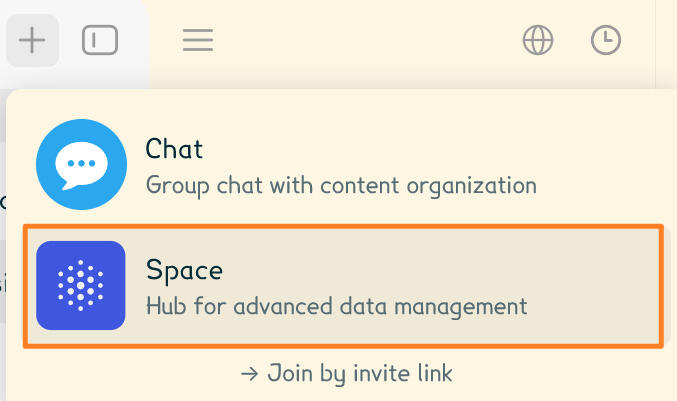
1. Create Profiles
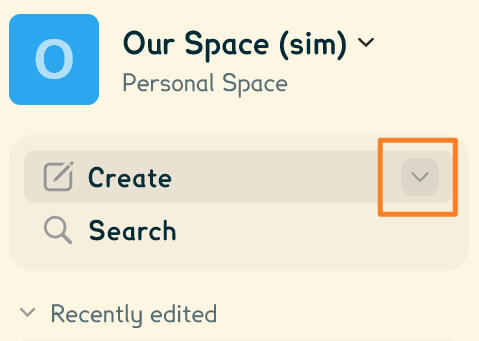
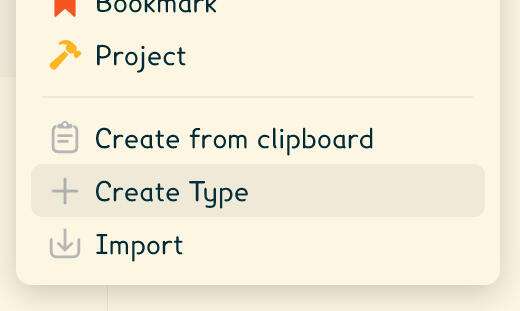
Before chatting, you'll want your messages to be attached to different profiles.To do this, first click the down arrow next to "Create", then "Create Type".
Mobile: From your space, go to Settings (cog icon on the top right corner) -> Object Types -> "+" Plus button
You will then see an "Editing type" screen.On the right side, give your type a name and a plural name.You can make customisations as you wish, just make sure you keep the "Page" format.Then under "Layout", change the "Layout type" to "Profile".
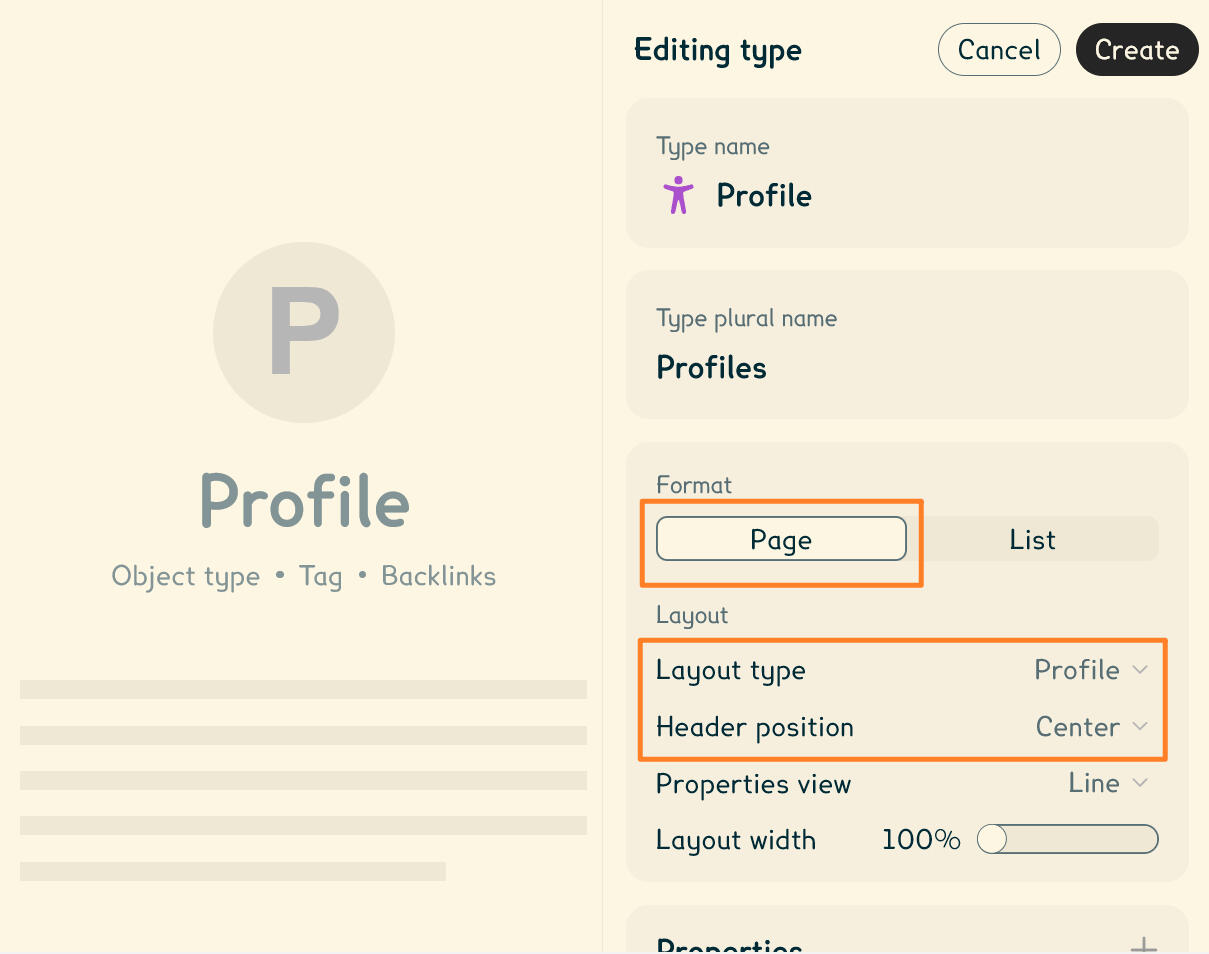
You may also want to set "Header position" to "Center".When you're done, click "Create"!
Pro tip: Pin the type to the sidebar, so it's quickly accessible. A pin button is located on the top-right corner of the screen.
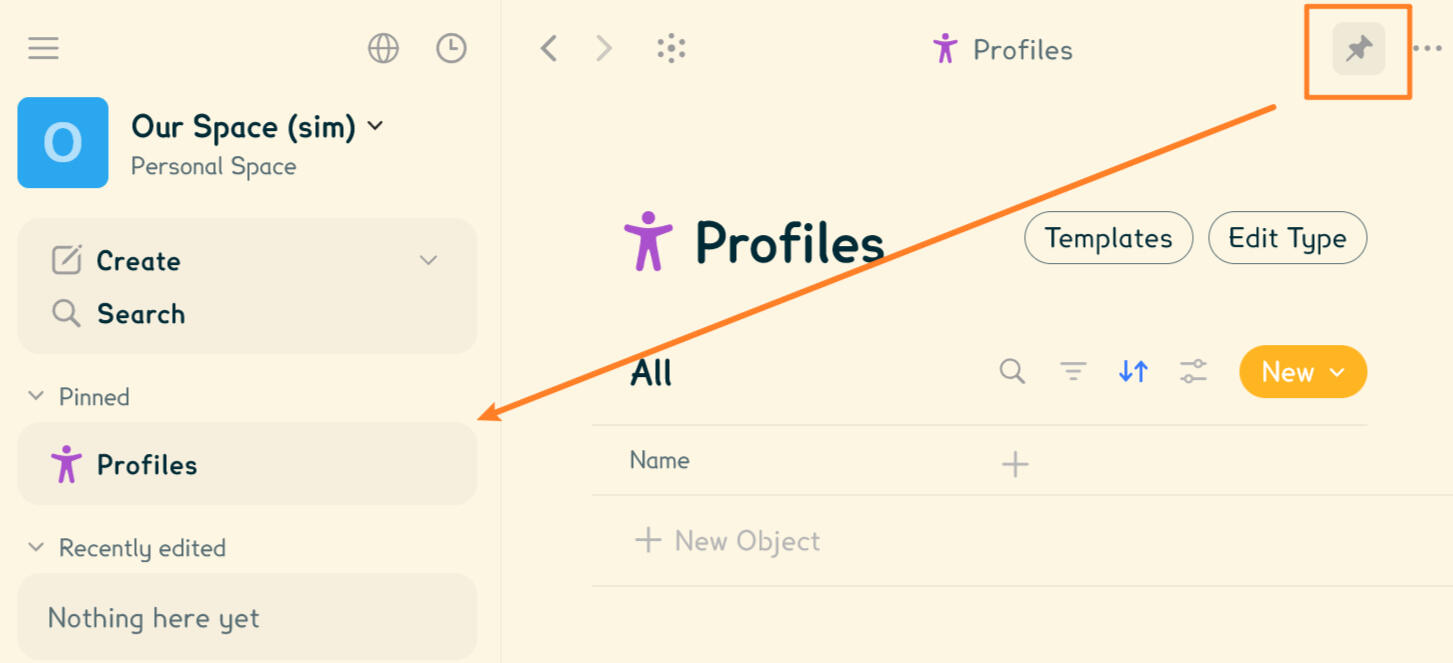
From your new type, you'll be able to create profile objects in any way you all want!In our example, we'll click "+ New Object" then (roughly) create Emi's profile.
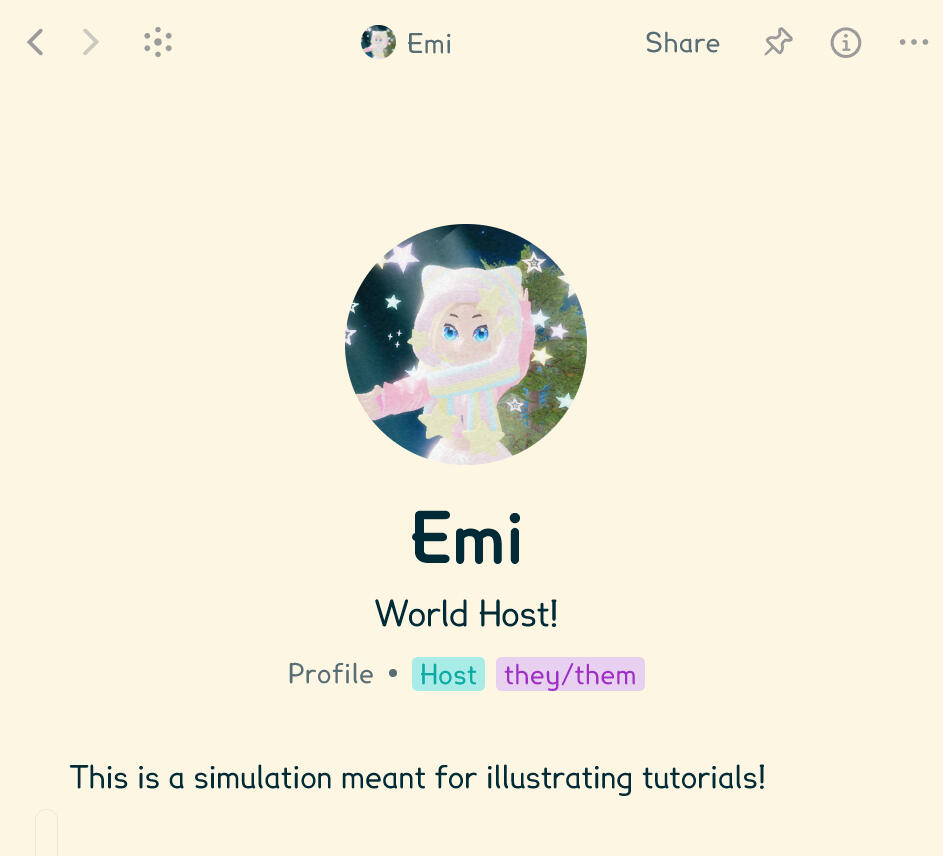
Pro tip: To avoid copy-pasting the same fields into all new profiles, take advantage of making a template and customising properties!
2. Create Chats
Now you'll want to create one (or multiple) chatrooms for your profiles to talk.To do this, a "Chats" type is already available to use by default. Click the down arrow in "Create" -> then "Chat".
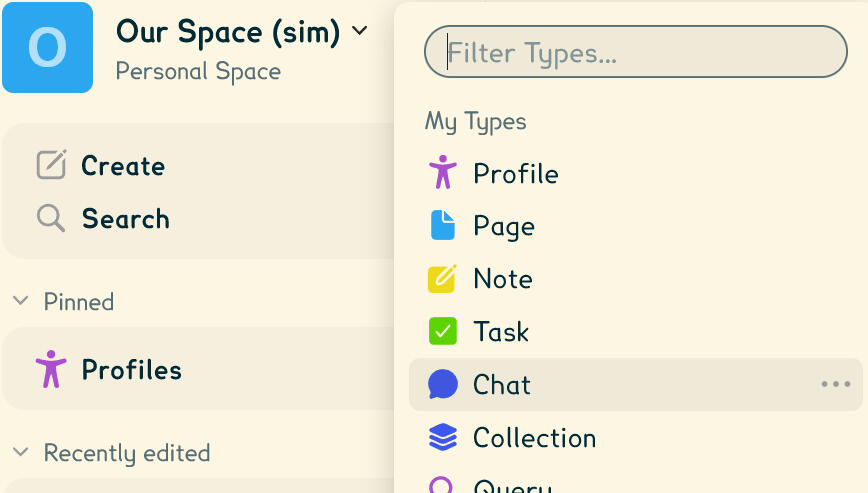
Name your chatroom and customise it, in our example we'll name it "Lounge"; then it'll create and open for you.
Pro tip: Before using it, you'll also want to pin the "Chats" type, found in your sidebar under "Objects", the same way as you did earlier with profiles.
3. Start using Chats!
Simply send messages as you wish, but most importantly, you'll want to attach a profile to your bubbles as soon as the author changes.To attach a profile, press the + button -> then "Existing Object".
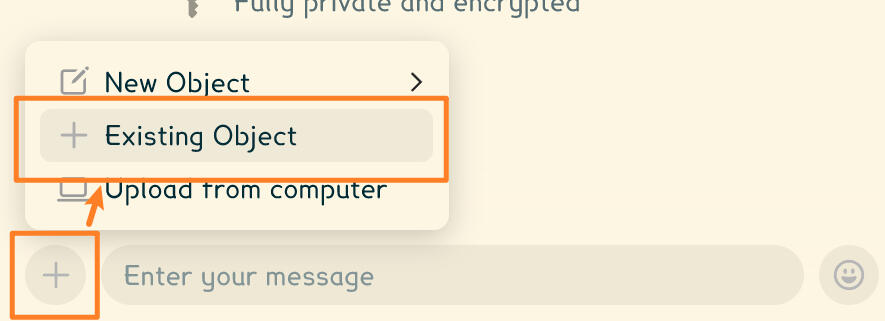
From the screen that pops-up, simply find and select your profile. It'll then be attached to your message.Then simply start typing anything you want as your message, and send it!Here's a little example conversation:
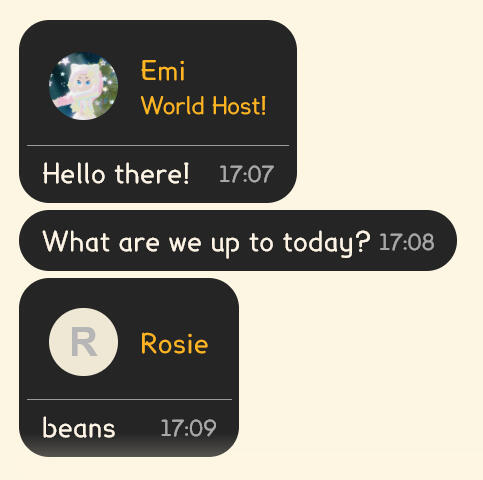
Guess they'll bake some beans!Note: We use custom CSS theming across our desktop app, and the visuals for you& will be different. However, we do share some of our code, especially for chats, that you can get from here.
We hope this tutorial helped you& figure things out, and that you& enjoy using chats as a plurality in Anytype!
<-- Set up Anytype for fronting
This tutorial was made using Anytype v0.54.5 on Windows.Although the steps are possible on mobile, they are best followed using Anytype's PC version.
Prerequisites
Here we will assume you've already made a space along with profiles, which you can learn from the first part of the profiles & chats tutorial.
1. Create a new Type
To keep front logs organised in one place, we're going to create a new type exclusively made for them.To do this, first click the down arrow next to "Create", then "Create Type".
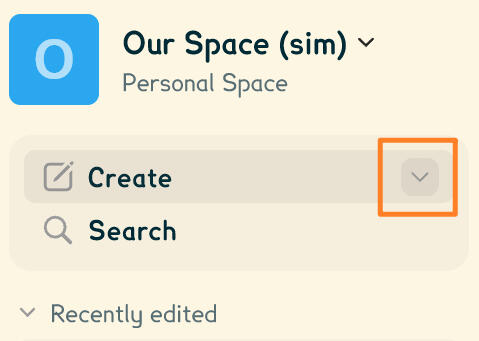
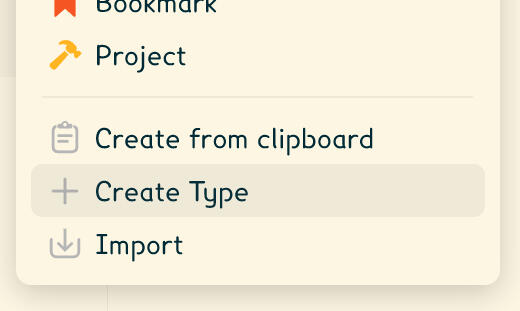
Mobile: From your space, go to Settings (cog icon on the top right corner) -> Object Types -> "+" Plus button
You will then see an "Editing type" screen.On the right side, give your type a name and a plural name. (such as "Front·s", "Front entry/ies" or "Front log·s")Then under "Layout", change the "Layout type" to "Note".
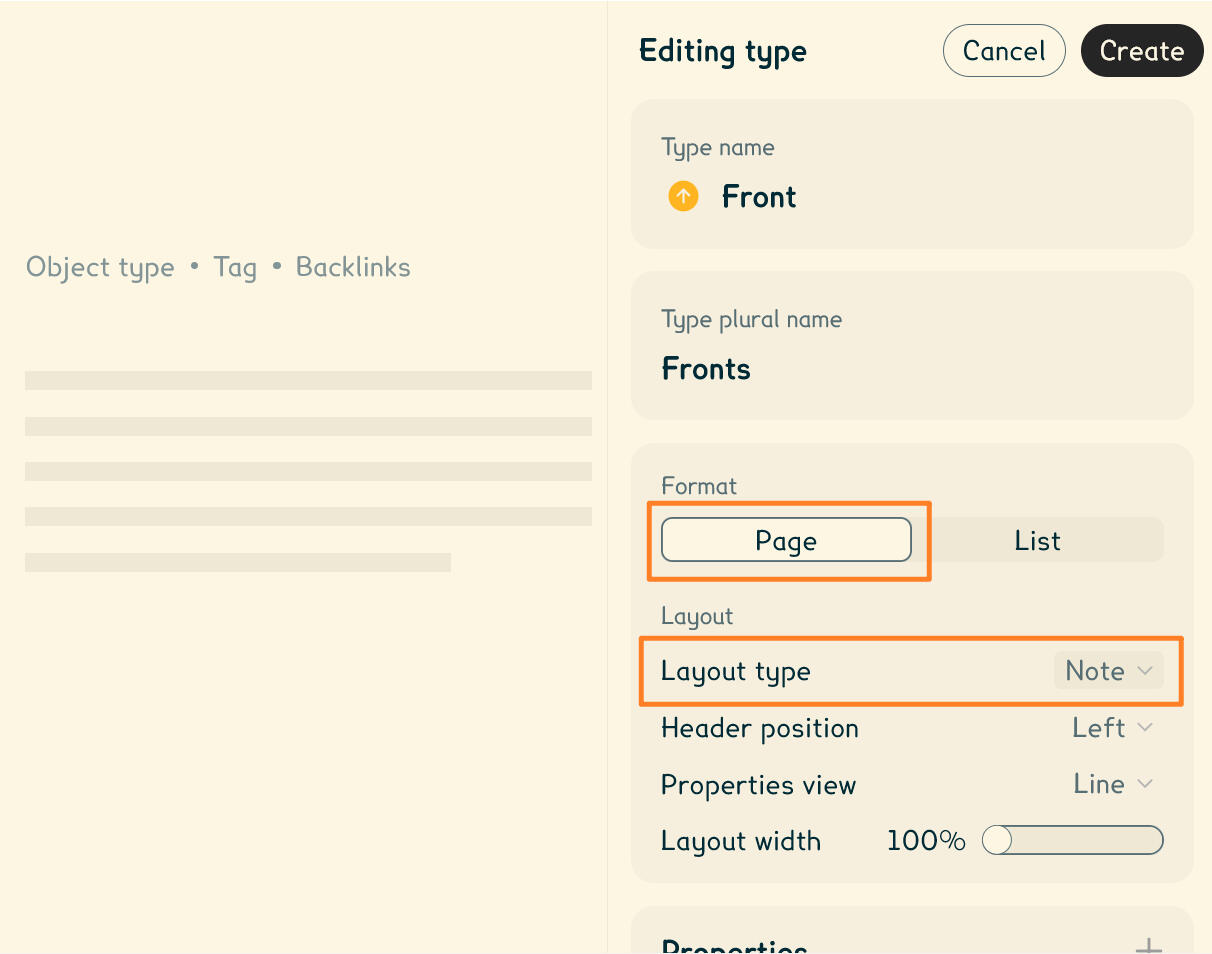
You can make customisations as you wish, just make sure you keep the "Page" format.Once you're done, click Create.
Pro tip: Pin the type to the sidebar, so it's quickly accessible. A pin button is located on the top-right corner of the screen.
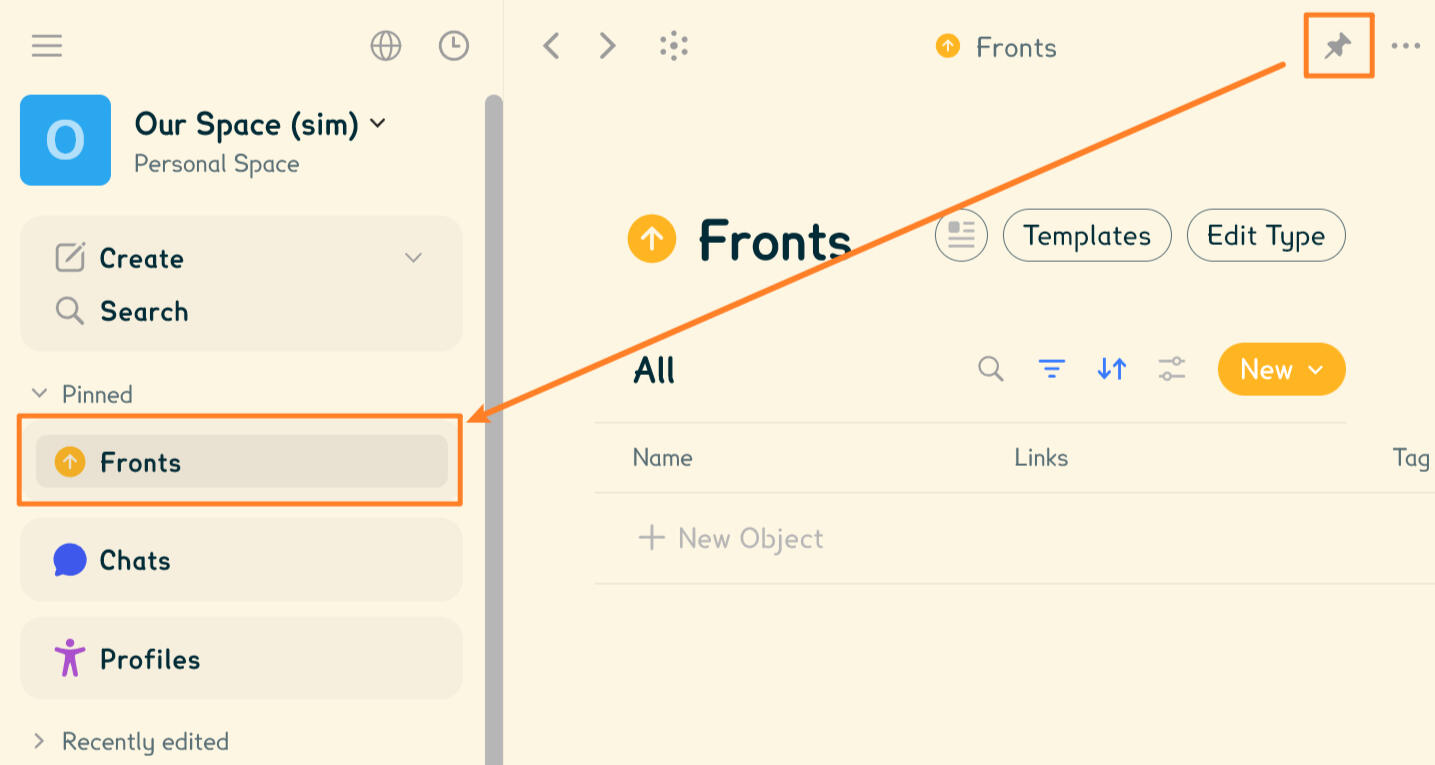
2. Set up Profile Links and Entry Dates
From the type's overview, click "Edit Type".
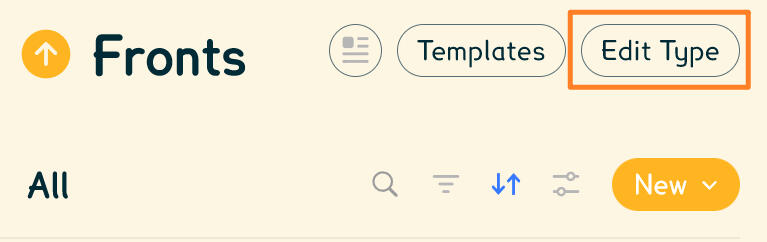
The little information parts you attach to an object, that are visible in views, such as dates, links, tags and more are called Properties. We will use them to set start and end dates, as well as to add profiles to a front entry.So first, let's make the properties through the "Editing type" screen.
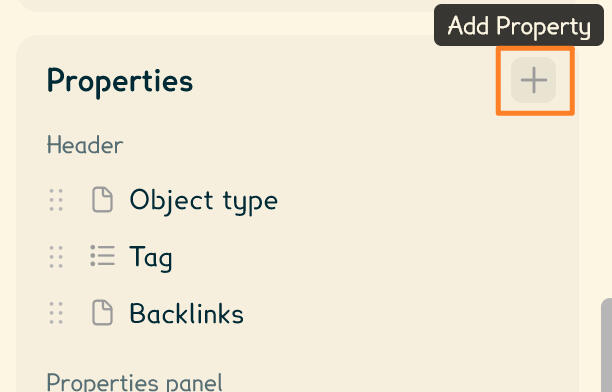
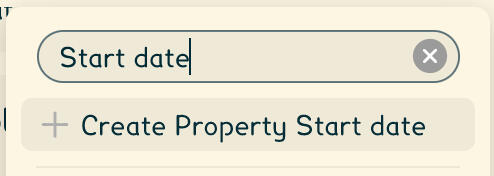
First, we're going to make the Start date property. This is simply when the front starts.After clicking +, simply type "Start date", then click "+ Create Property Start date"
The property creator will open, change the Property Type to "Date".
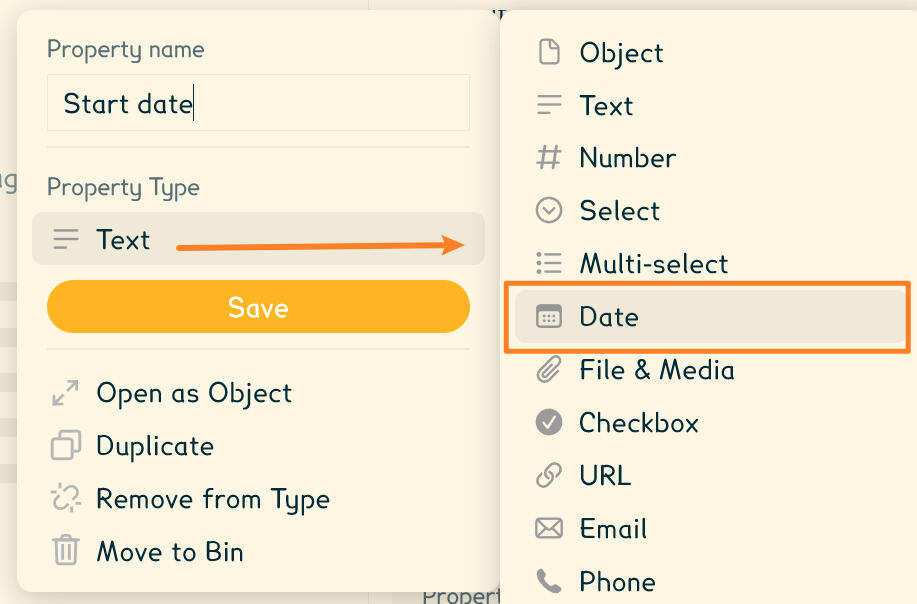
Note: Do not check "Include time". We'll include this later. This'll be for mobile compatibility.Once you're done, click "Save".
Now we're going to include the Start time.It is done the same way: Create a new property using the + button, then type "Start time".
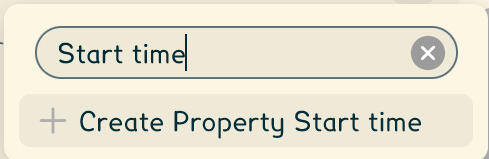
Set the Property Type to "Text".
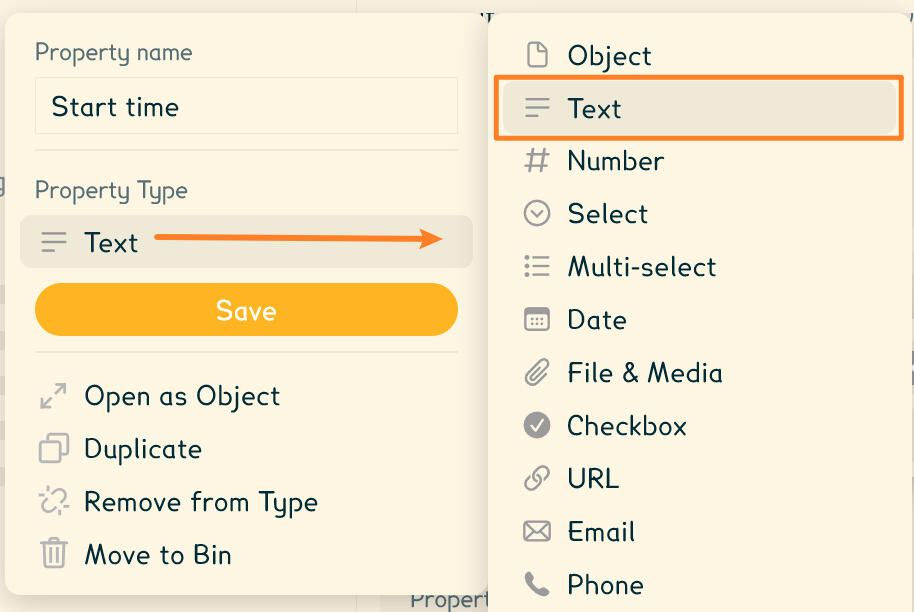
Then Save.
Now, you'll want the End date and time, because a front ends at some point.Create two more properties the same ways as you just did, but instead of typing "Start date" and "Start time", type "End date" and "End time".
Once they're also saved, you will find them in the Properties list in the type editor.We suggest you reorder these properties like the image below:
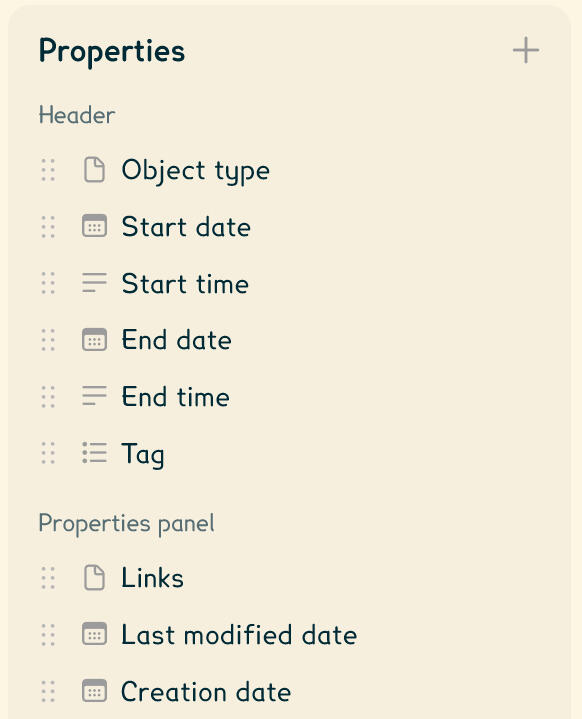
Text version:Header
Object type
Start date
Start time
End date
End time
Tag
Properties panel
Links
Last modified date
Creation date
Then, unless you need something else and/or want to do personal customisations, leave everything else hidden and Save.
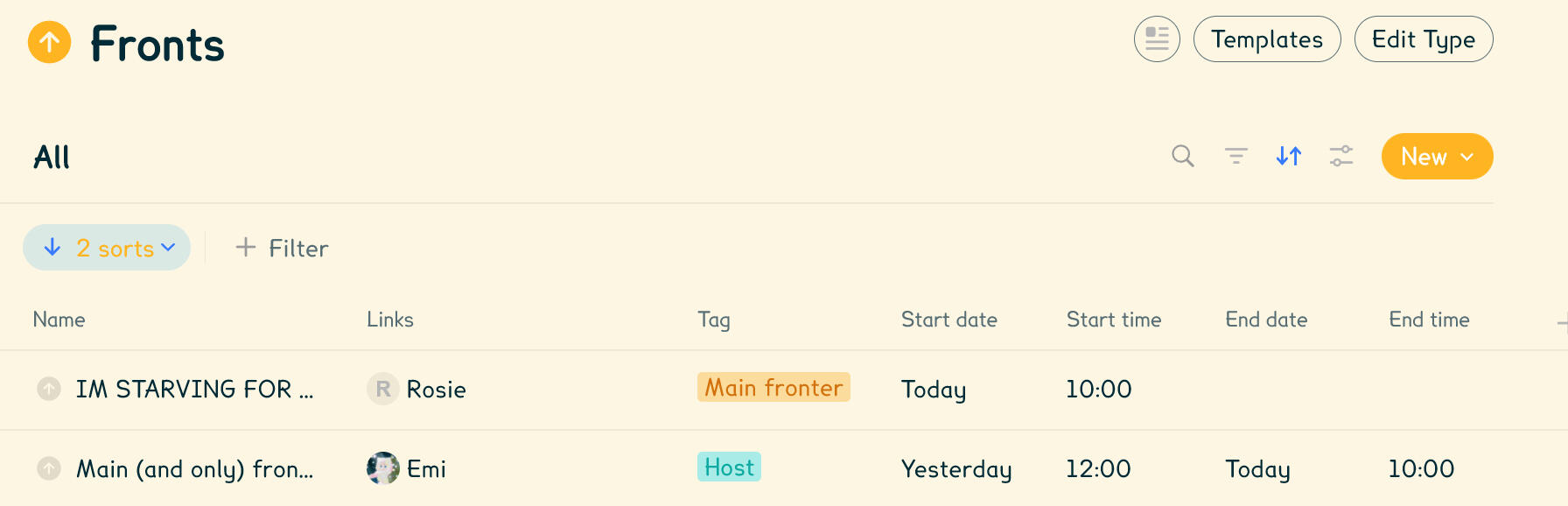
The last thing is to show your properties in your front type's overview. Because for now, you only see the "Name" one!To show other properties, click the + button located on the grid's head after everything else.
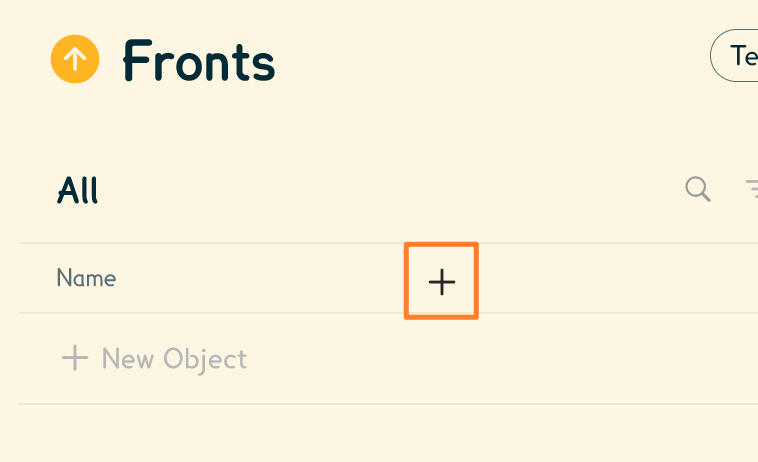
A list of all available properties with toggles will show.Let's then toggle on the properties we've set before:
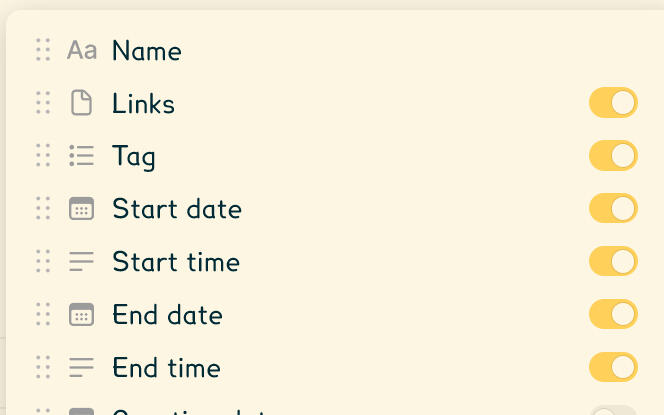
Text version:
Name
Links
Tag
Start date
Start time
End date
End time
Everything else can be left as-is, toggled off.
Finally, let's sort our entries, so the most recent fronts are shown to the top.Click the "Sorts" button, represented as two opposite facing arrows.

A new row will open, showing your sorts and filters.
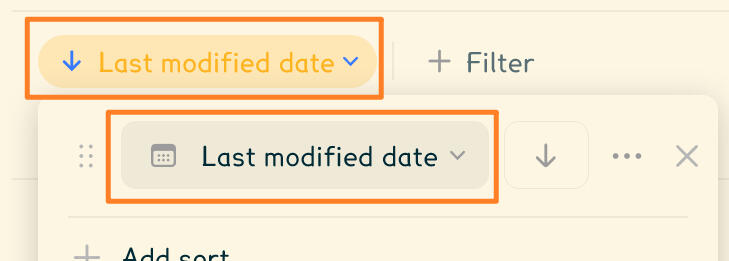
You'll want to change from "Last modified date" to your "Start date".Then let's also do it by time: click "Add sort", then select "Start time".If the arrow is facing upwards, click it to flip it downwards.The end result should look like this:
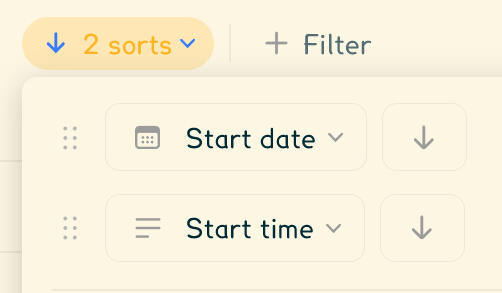
Text version:
Start date: Descending
Start time: Descending
Your fronting overview is finally ready!
3. Start logging entries!
Pro tip: Want your front logs to have preset fields? Create a template that will be applied to all your new entries!Now's time to hit the shiny New button!

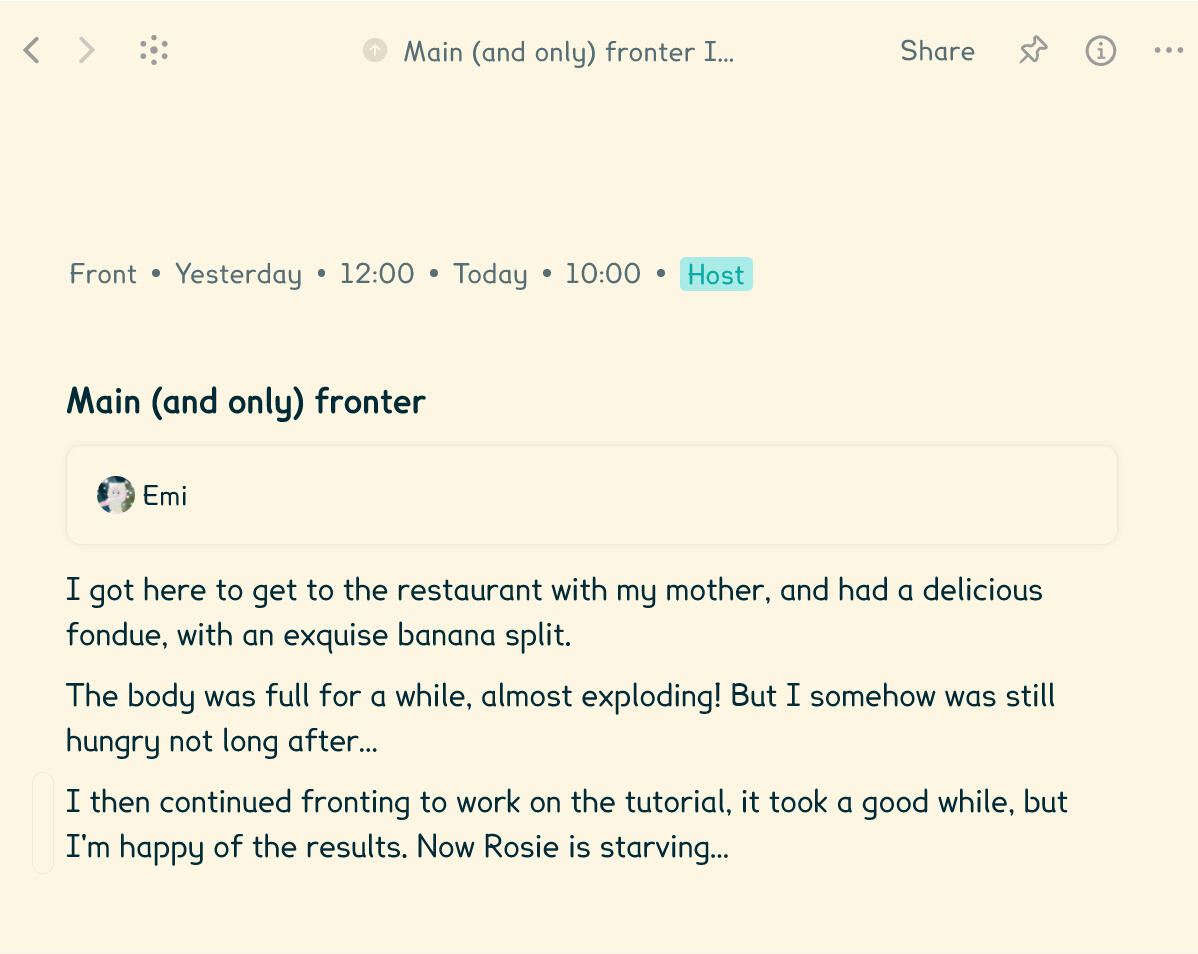
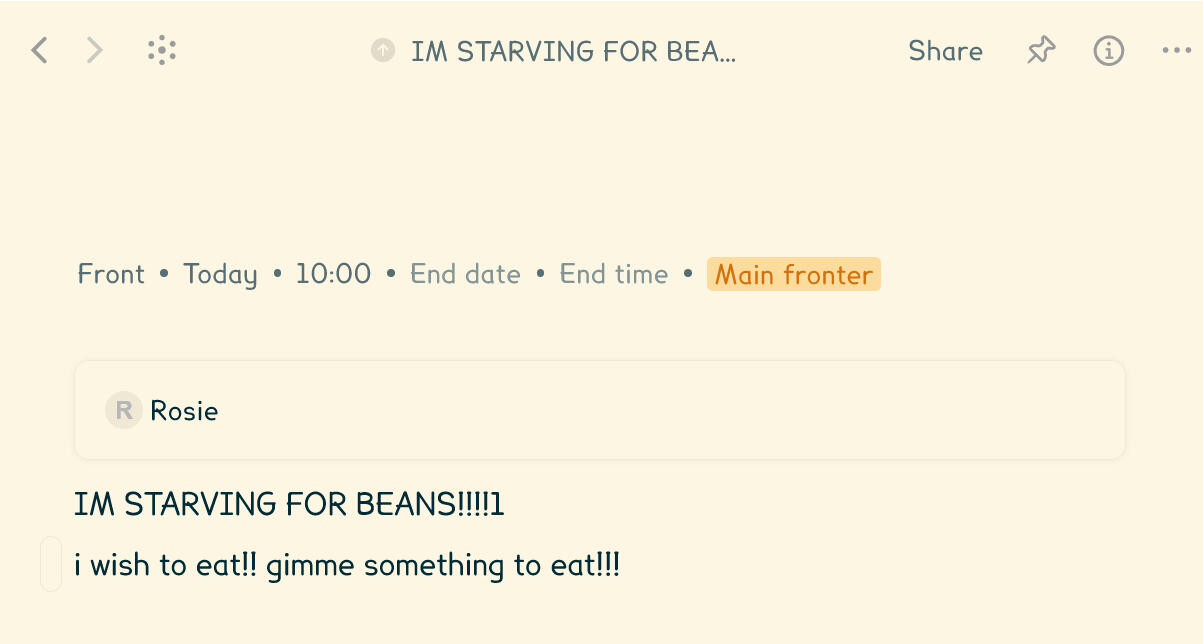
So here's how it works: Creating a front entry will make a page where you will be able to input absolutely everything you want. This means you can journal in there as well!But here's what you will need to remember before everything else:
You set your Start date and time on top of the page. If this entry is no longer present, you'll want to set an End date and time as well;
You can add tags that can indicate a front status, for example;
Link a member / profile by typing a
/slash on an empty area then just type a name and let the auto-complete do the rest. You can link as many profiles as you want;Anything else that you type will preview in "Name" back in the overview (only a small portion is shown).
Finally, here's how it looks (almost) concretely!
1. Emi's front
2. Rosie's front
3. Overview of both fronts
That's finally all!Note: We use custom CSS theming across our desktop app, and the visuals for you& will be different. However, we do share some of our code that you can get from here.
We hope this tutorial helped you& figure things out, and that you& will make the most out of logging fronts on Anytype!
<-- What are "FAV"/"Favourite" apps?
It's simply a matter of personal preferences – as the project builders. Nothing less, nothing more! It's totally okay to like one app / tool and not another, this is not something we police, this project exists for a reason.(Eventually, we'll expand this page in case of doubts.)
<-- What are "Early" Releases?
We are working on this page. Please come back later!
<-- What are "Retired" or "Discontinued" services?
Discontinued / Retired services have announced they plan on no longer maintaining their project, which means no more updates, a likelihood of remote servers shutting down at a provided date, and no more official support. If you see a tool with this note, then they have made an official announcement, which you should check from their blog or announcement channel, as they will provide all the information you'd ever need to know.We will continue to list discontinued tools as long as they continue maintaining support, until its provided deadline. Once official support ends AND the tool is no longer functional, it will be archived in our project and no longer visible from our listing.
--> Redirecting to #qna…
--> Redirecting to #retired…
Templates & Inspirations
This is a new, upcoming feature that we're adding into the project! We will add a bunch of what we've already done ourselves first, then will open to everyone to submit their work to this site!While we are working on this feature, you can start working on submissions in the mean time! If you do, make sure to abide by the Submission Guidelines that are already available. We hope to see you in a ticket!!
--> Redirecting to #submissions…
--> Redirecting to #submissions…
--> Redirecting to #submissions…
The P4& News
Welcome to P4&'s blog, where you will be able to know everything that changed in this project, as well as other related news! Join our support to get notified about newly published articles.
<-- Welcome to a new era for referencing plural tools.
Created: 2026-02-26 — Modified: 2026-03-11
No more need for app store / web search attempts. You now find yourselves in a completely unified website, and it's replacing our classic Any pages!
Why these changes?
For regulars, some of the reasons are obvious, but for everyone, here's a whole breakdown on the main differences:
The main reasons being ease of access and transparency. Until now we could do as much as what was possible for free, but things weren't always the most accessible, so we bought an affordable plan that won't quickly expire.
Shorter links, easy to remember. Our initials in letters are
p4p, followed by.crd.coas the premium Carrd domain. Then page names like this one go after the#, this allows readability before people open links to specific pages. Way better than a huge string of random characters in between.More ways to explain. Previously, we were limited to basic Markdown features to list apps and answer questions. Now, we hope things will feel more straightforward.
A nice look, overall! We tried our best to make this site feel like home, and will continue improving on design where possible.
In the end, we understand that people have different feelings about changes, and/or are having issues with some of them. As P4& is building a stable identity, some sacrifices had to be made. We plan to keep our old any.coop links to redirect to this site. And of course, we are always open to feedback: if you have some, please tell us in our support!If you're new, then welcome to P4&! We sincerely hope that you all will make the most out of our project. Helping is our drive, and referencing digital plural tools is a must that has to be done somewhere.
About P4&
Who are we?
Hi! We are Euphya (old link if the new one doesn't work) — a plural hoard of beings living in a separate world, and the only ones working on this project! (...That's it, that's handled by one single available body.)This project is the result of an amazing passion from our dedicated writers and lots of potential from our researches!Ultimately, P4& is a hobby project. This means, we work on it and help people during our free time. We also don't earn anything and instead pay a small yearly fee to host this website. However, we still hope you will consider this project as more than just a hobby, but as your go-to resource of digital plural content!
Thank you!
We cannot have this page without thanking our lovely contributors who helped us answer questions, helpers for the support, the actual developers for such amazing tools, and you reading this! As the owners, we will continue to improve this project, including this site and the support we handle.
Support
Do you(&) appreciate the project and wish to support it?
Here's how to do it:
Share the project: There are always people out there who could benefit from P4& and would miss out otherwise!
Help others: Make our work easier by contributing to the support server! If you wish to help us keep our server peaceful by moderating, then create a private thread to ask for a role. (Known official developers always get a role.)
Give feedback: Whether it's positive or critical, constructive feedback is more than welcomed in our server!
Donate to the actual projects: Let's remember P4& is a hobby project that lists other projects (the apps and tools you'll stick with) and doesn't take credit on developing the actual stuff out there! So go support that one app or tool you love, we'd only be glad for it! And don't worry about us, hosting this site is more than affordable.
The backstory…
During most of 2025, we, as a polyfragmented plurality, had to go through many struggles and controversies. Things happened over time and this resulted in making us want to switch to alternative apps and tools multiple times. For almost a whole year we experimented things without true success, and why? Because the app stores, and even web searches, would only provide the few same apps over and over again, and not tell anything else. When it comes to looking for precise needs, app stores aren't reliable. That isn't necessarily anyone's fault; in fact, that's because you need to think outside the box.So while looking for a true alternative that would near perfectly fit our actual needs, we then thought: "We can't keep this knowledge to ourselves. There are plurals who struggle worse than us, because they haven't found the right tools, and it'd only feel wrong to not help those in need with the potential our knowledge has." That's where this project comes in.You must have heard of Simply Plural: it's the most widespread app for plurals. For our case, it was a great "starting point". But over time, our concerns about protecting our data only kept growing, until we eventually mined gold and made the switch to something truly reliable to us. But before that, we had to go through trying several apps, websites, even the default Notes app, and doing many transfers came with a time cost of whole months just for organising. That's all the precious time we want you all to avoid wasting, especially if you all are polyfragmented. Plurals, just like anyone else, should be able to easily find their resources and control which apps and tools they want to use. In a way that's like for apps that serve other purposes. And even after this story that lead to P4&'s beginnings, we want this project to continue growing in all its aspects.
Miscellaneous dates
This site was recreated on 24th February 2026 while moving from classic pages. That is the date of when we took the handle;
The listing and its support server on Discord actually started on 29th December 2025, so yes, surprisingly we are rather new, but we've known things since early 2025!
Get Volunteer Help
We are working on this page. Please come back later! You can directly join us here!
<-- Guidelines
Interaction Guidelines
Behaviour
Our support places welcome everyone no matter their stances, likings and beliefs. Policing is based on our own vision of common sense, where kindness is our drive and respect, including of any personal boundaries and of any alternative tools, shall never be underestimated.We believe that basic behaviour comes from education and should not be written as rules, no matter where you are.
Moderation
This is a drama-free project. Any disturbing or problematic behaviour may result in either your messages getting deleted, or if required, your rights for chatting being taken away, depending on the case.Moderation cases are something we try to avoid as much as possible, but they will happen if we need to.We support English-first interactions. Other languages are harder to understand and are prone to wrong translations, but they can be used only if truly necessary.
Tolerance
This project has a set goal, it is to help and be helped. And it must only be used for this specific purpose. Members must end a conversation with positive and/or helpful impact, which means slight off-topic discussions can be allowed depending on context.However, support places are not meant to be social. For true social interactions, we still advise you go to an actual social server, such as the ones listed in this page.And finally, take the habit of reading channel descriptions to know what they are about and where you should do different things!
Security
Disable DMs from our servers!
We recommend that you turn off all Direct Messages from our servers.On Discord, right click or long press the server icon -> Privacy Settings -> Turn off Direct Messages.This is because this is a public support server, which does not provide specific security layers.For any private support, we use private threads.If you are looking for a plural-friendly social server, check out this page!
Submission Guidelines
Acceptance
When submitting an inspiration or template, you acknowledge that all content in your submission:
Can be viewed and used by everyone. This includes people outside of your personal blocklist ("DNI" lists, blocked people, etc). You can allow or deny private messages, but anyone can ask for help about your submission.
Is free from identifiable information and blurring. This is to maximise both quality and security for our members. You can create a separate copy of your content, change information if it is based on actual stuff, and use that copy for your submission.
Is legal and abide by Discord, Carrd and any other involved terms of service, content policies and guidelines.
Is "Safe For Work". This site is viewable by people of all ages, and we absolutely do not permit age restricted content.
Does not involve money. All submissions are viewed, used and supported for free. Remember that P4& is a hobby project and we build it during our free time.
Accessibility
We require all submissions to be accessible to as many people as possible.
For plain-text content, do not use fancy fonts and avoid excessive unusual characters. These are fine to use in images that are not previewing the actual content.
If you use image links, we require you to use a reliable service and that your images do not expire. We recommend you use ScratchUpload and avoid services such as Catbox and File Garden (as these tend to block apps like Simply Plural). If you want to change a link, feel free to open an edit request through our support server.
Copyright
All content in your submission must be copyright-free.
This means, everything must be made by yourself and/or from authors that gave you permission to use their content for your submission.
If your submission uses content made by other authors, please name them all and specify whether they need crediting.
You agree not to hold us responsible for any copyright claims that may occur if you didn't properly verify permissions.
If you are the author of any content that's not allowed to be used by the submitter, you may open an edit or removal request ticket in our support server.
Rights
When submitting, you have the right to specify a handle username ("@you on social media") that will be displayed in this site. This is not mandatory, in that case you will have a randomised "Anonymous" handle that will be kept for moderation purposes. In the case where you specify a username, we will check any linked social account for any problematic content.
You must specify whether you want to be credited or not. If you use an anonymous handle, then you can require people to credit your work through your submission page in this site directly.
Your submission cannot contain boundaries such as a DNI list. If you do not want people to interact with you, then use an anonymous handle mentioned above.
When submitting, after answering the pre-filled questions, make sure you include at least one preview image for all kinds of submissions, and the raw content for templates. Inspirations can include partial assets if wanted.
End line
Ultimately, we will accept submissions that do not contain any problematic content. If such is found, you'll be asked to change things directly inside your ticket. In the worst case, we do not deny genuine submissions, but you can cancel your submission if you change your mind.
<-- Social Medias
We are working on this page. Please come back later, or use the legacy pages!